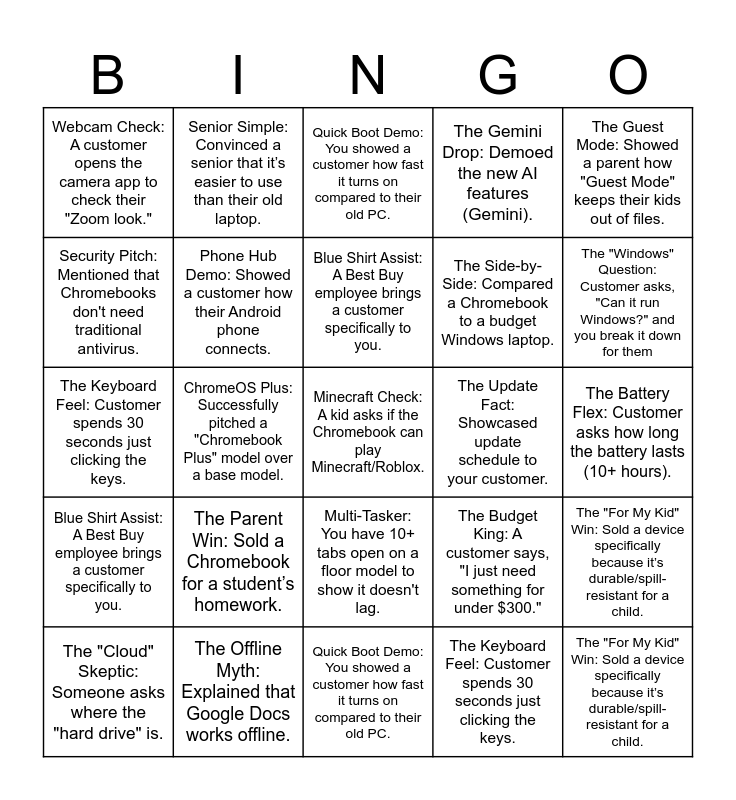
This bingo card has 51 words: The "Windows" Question: Customer asks, "Can it run Windows?" and you break it down for them, Minecraft Check: A kid asks if the Chromebook can play Minecraft/Roblox., The "Cloud" Skeptic: Someone asks where the "hard drive" is., Quick Boot Demo: You showed a customer how fast it turns on compared to their old PC., The Parent Win: Sold a Chromebook for a student’s homework., The Shortcut Flex: Wowed a customer by using a cool keyboard shortcut (like the Emoji picker or Screenshot)., Senior Simple: Convinced a senior that it’s easier to use than their old laptop., The Tablet Flip: Demoed a 2-in-1 / 360-degree hinge to a customer., Security Pitch: Mentioned that Chromebooks don't need traditional antivirus., The Offline Myth: Explained that Google Docs works offline., Phone Hub Demo: Showed a customer how their Android phone connects., The Gemini Drop: Demoed the new AI features (Gemini)., The "For My Kid" Win: Sold a device specifically because it’s durable/spill-resistant for a child., The Budget King: A customer says, "I just need something for under $300.", Gaming Surprise: Explained Cloud Gaming (GeForce Now/Xbox) on ChromeOS., The Battery Flex: Customer asks how long the battery lasts (10+ hours)., Blue Shirt Assist: A Best Buy employee brings a customer specifically to you., The Update Fact: Showcased update schedule to your customer., The Bundle Beast: Sold a Chromebook plus an accessory (mouse, sleeve, or monitor) in the same transaction., The Guest Mode: Showed a parent how "Guest Mode" keeps their kids out of files., ChromeOS Plus: Successfully pitched a "Chromebook Plus" model over a base model., The Keyboard Feel: Customer spends 30 seconds just clicking the keys., Webcam Check: A customer opens the camera app to check their "Zoom look.", The Side-by-Side: Compared a Chromebook to a budget Windows laptop., Multi-Tasker: You have 10+ tabs open on a floor model to show it doesn't lag., The "For My Kid" Win: Sold a device specifically because it’s durable/spill-resistant for a child., The "Windows" Question: Customer asks, "Can it run Windows?" and you break it down for them, Minecraft Check: A kid asks if the Chromebook can play Minecraft/Roblox., The "Cloud" Skeptic: Someone asks where the "hard drive" is., Quick Boot Demo: You showed a customer how fast it turns on compared to their old PC., The Parent Win: Sold a Chromebook for a student’s homework., The Shortcut Flex: Wowed a customer by using a cool keyboard shortcut (like the Emoji picker or Screenshot)., Senior Simple: Convinced a senior that it’s easier to use than their old laptop., The Tablet Flip: Demoed a 2-in-1 / 360-degree hinge to a customer., Security Pitch: Mentioned that Chromebooks don't need traditional antivirus., The Offline Myth: Explained that Google Docs works offline., Phone Hub Demo: Showed a customer how their Android phone connects., The Gemini Drop: Demoed the new AI features (Gemini)., The Budget King: A customer says, "I just need something for under $300.", Gaming Surprise: Explained Cloud Gaming (GeForce Now/Xbox) on ChromeOS., The Battery Flex: Customer asks how long the battery lasts (10+ hours)., Blue Shirt Assist: A Best Buy employee brings a customer specifically to you., The Update Fact: Showcased update schedule to your customer., The Bundle Beast: Sold a Chromebook plus an accessory (mouse, sleeve, or monitor) in the same transaction., The Guest Mode: Showed a parent how "Guest Mode" keeps their kids out of files., ChromeOS Plus: Successfully pitched a "Chromebook Plus" model over a base model., The Keyboard Feel: Customer spends 30 seconds just clicking the keys., Webcam Check: A customer opens the camera app to check their "Zoom look.", The Side-by-Side: Compared a Chromebook to a budget Windows laptop., Multi-Tasker: You have 10+ tabs open on a floor model to show it doesn't lag. and The "For My Kid" Win: Sold a device specifically because it’s durable/spill-resistant for a child..
⚠ This card has duplicate items: The "Windows" Question: Customer asks, "Can it run Windows?" and you break it down for them (2), Minecraft Check: A kid asks if the Chromebook can play Minecraft/Roblox. (2), The "Cloud" Skeptic: Someone asks where the "hard drive" is. (2), Quick Boot Demo: You showed a customer how fast it turns on compared to their old PC. (2), The Parent Win: Sold a Chromebook for a student’s homework. (2), The Shortcut Flex: Wowed a customer by using a cool keyboard shortcut (like the Emoji picker or Screenshot). (2), Senior Simple: Convinced a senior that it’s easier to use than their old laptop. (2), The Tablet Flip: Demoed a 2-in-1 / 360-degree hinge to a customer. (2), Security Pitch: Mentioned that Chromebooks don't need traditional antivirus. (2), The Offline Myth: Explained that Google Docs works offline. (2), Phone Hub Demo: Showed a customer how their Android phone connects. (2), The Gemini Drop: Demoed the new AI features (Gemini). (2), The "For My Kid" Win: Sold a device specifically because it’s durable/spill-resistant for a child. (3), The Budget King: A customer says, "I just need something for under $300." (2), Gaming Surprise: Explained Cloud Gaming (GeForce Now/Xbox) on ChromeOS. (2), The Battery Flex: Customer asks how long the battery lasts (10+ hours). (2), Blue Shirt Assist: A Best Buy employee brings a customer specifically to you. (2), The Update Fact: Showcased update schedule to your customer. (2), The Bundle Beast: Sold a Chromebook plus an accessory (mouse, sleeve, or monitor) in the same transaction. (2), The Guest Mode: Showed a parent how "Guest Mode" keeps their kids out of files. (2), ChromeOS Plus: Successfully pitched a "Chromebook Plus" model over a base model. (2), The Keyboard Feel: Customer spends 30 seconds just clicking the keys. (2), Webcam Check: A customer opens the camera app to check their "Zoom look." (2), The Side-by-Side: Compared a Chromebook to a budget Windows laptop. (2), Multi-Tasker: You have 10+ tabs open on a floor model to show it doesn't lag. (2)
Chromebook Bingo | BBWGO Contest! (Selling Floor Edition) | Winter Sales Bingo | BANKER BINGO | ART of Service BINGO
Share this URL with your players:
For more control of your online game, create a clone of this card first.
Learn how to conduct a bingo game.
With players vying for a you'll have to call about __ items before someone wins. There's a __% chance that a lucky player would win after calling __ items.
Tip: If you want your game to last longer (on average), add more unique words/images to it.